Showing posts with label Destiny Follett. Show all posts

Wednesday, May 13, 2015

Library Orientation as "Interval Training"

At the beginning of the year, grade 9 Foundations classes
Quick! Get those Deweys in order!
completed an "interval training" to learn about using the library. 


The goal: Work in teams to figure out all of the amazing ways the library and its services can help them during the year.

The other goal: No teacher talk!

Here's the doc with handouts for each station and an overview of the lesson. It's a full period (70 minutes) but could easily be broken up into several mini-lessons.

Students document each skill with smartphones and social media. If students don't have phones, they can borrow an iPad and use their email to send their evidence to me.

Skills covered: (links go to station directions)
Finding areas in the library
Finding call numbers
Dewey order & Library Website
Using the catalog
Library in Your Pocket (Installing Destiny and other apps)
Using Resource Lists & QR codes

This is LOUD and lots of fun. 

All you need to do is set up each station as far apart as possible with the directions and any materials needed. I told students "No questions. Read the directions!" and actually did have some groups do it all on their own correctly (!) 

Tuesday, April 29, 2014

Spring (Catalog) Cleaning

If you can find time, it feels great to do a little "spring cleaning" in your catalog system. 

Here are some steps for dealing with duplicate records.

First, create a private resource list called "Duplicates". 
This is handy for when you see duplicates as you're working on other things; you can add to the list and deal with them later.

Second, identify the duplicate titles in your collection.
Go to Catalog > Update Titles > Standard Numbers tab.
Catalog > Update Titles > Standard #s to find duplicate records

Select the numbers you want to see matches for and the report will gather a list of the records that have duplicated ISBN and other standard numbers.

View the report when it's complete (example below). You'll see the duplicate titles with links so you can view each of them. View and add each to your "Duplicates" resource list. (You'll see that some may not really be duplicates, such as a multi-volume set needing separate records for each volume).


Sample Report of Duplicates

Go to Resource Lists and view your "Duplicates" list. 
Select two or more titles that are the same and choose "I want to .... view duplicate titles". 


Select duplicate titles, then choose "I want to View these Duplicates"

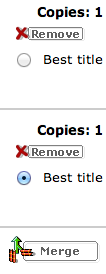
On the next screen, look at each record and decide which is the best for you. *Consider reviews or digital resources added. Once you merge to the "best" one, all information from the other records will be gone!

Select the record you like the best and click "Merge".

Now you have only one record but the copies are still there (with their various call numbers if they were different). For example, I have some books in our Middle School section and also in our Teen section, so they have different call numbers, but now they have the same record. 

Ta-dah!

Want more Follett Destiny tips?
Relate for better holding
Curriculum Tags to Prep a Book Order
Customize your Top Ten

Tuesday, April 22, 2014

"Relate" for Better Holding

Follett Workshop take-away #3
(see also #1: Customize your top ten and #2: Curriculum tags)

The Problem:
A patron holds a title that has copies in different titles or editions. When she places the hold, the other copies don't queue up for her. She waits and waits for Harry Potter and the Sorcerer's Stone; meanwhile, her friend sails into the library and checks out Harry Potter and the Philosopher's Stone

So not fair!

The Solution:
Use the "Relate Titles" function.

Management tip! Create a private list for yourself called "Relatable Titles" and add to it as you notice popular titles that would do well linked together.

To connect books with various editions or titles: 
1) Go to Catalog > Update Titles > Relate Titles tab.
2) Create a group name (such as TFIOS or Harry).
(Choose your group name carefully because it's not possible to edit the name later).
3) Add copies to the group by choosing the "edit" button and then searching or scanning in barcodes.


Now, when your patron holds the American version of Harry, she'll be in line for the British version, too.

Ta-da!

Note: This is not for picky customers. Only relate titles that seem interchangeable to your readers.  

Also note: If you are bothered by duplicate records, that's a different issue with a different fix.

I like my versions of John Green books, for example, to stay separate because we see the different covers. So I use "Relate Titles" for our editions of Paper Towns, and An Abundance of Katherines, for example.


How will YOU use "Relate Titles"?


Sunday, April 13, 2014

Destiny Take-away: Customize your top ten

Just spent a fab long weekend in Rome learning about the latest features and behind-the-scenes tricks of Follett's Destiny catalog. 

Here's the first of several take-aways I'll be posting. 

1) Customize your Top Ten list in Destiny Quest

The Problem: 
The Top Ten list in Destiny shows things like power cords, or the same titles over and over, or odd titles that don't seem to reflect your users.

The solution: 
Customize what shows on your Top Ten list.

How: 
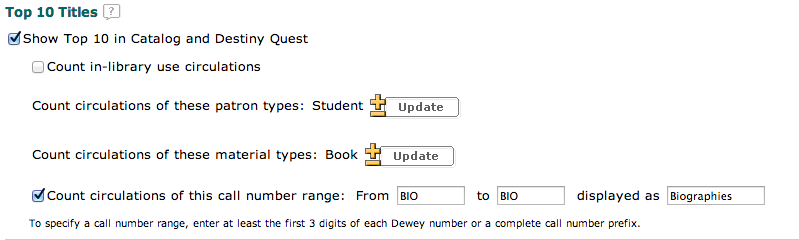
Go to Back Office > Site Configuration > Top Ten titles.

Choose a call number range (BIO - BIO or a Dewey range or F - F) and then add a label. This will limit the titles counted in the Top Ten and give the list a heading!


You can also limit by patron type to show only student checkouts and by material type to show only books, or DVDs, or whatever you want. This would be a fun way to highlight parts of your collection that need a boost. 

Top Ten periodicals? Top Ten faculty checkouts? How do YOU imagine using this feature? Would love to hear your ideas.